Crafting Realism: The Multi-petal Roll Up Succulent
There is a specific satisfaction in holding a paper flower that feels alive. It isn't just about the color or the shape; it is about the dimension, the way light hits the curves, and the illusion of organic growth. This is where the Multi-petal Roll Up Succulent changes the game for paper crafters. Unlike traditional flat floral designs that rely solely on layering to create depth, this design utilizes a rolling technique that mimics the tight, spiraling rosettes found in nature's own succulents like Echeveria or Sempervivum. Whether you are a seasoned scrapbooker, a small business owner creating wedding favors, or an educator looking for a manageable yet impressive project for students, this template offers a bridge between digital precision and tactile artistry.
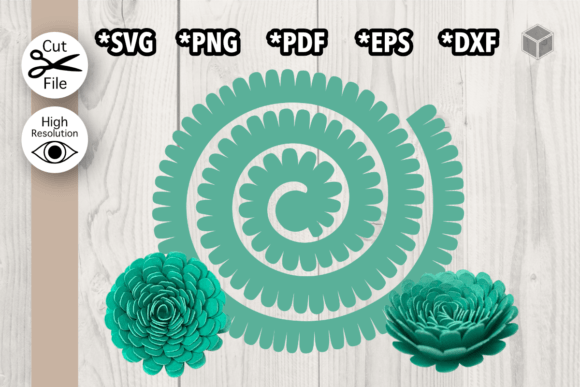
The core appeal of this design lies in its engineering. Creating a realistic succulent by hand from scratch requires a deep understanding of botany and advanced quilling skills. You have to gauge exactly how much to taper a petal and how tightly to roll it to achieve that perfect "bud" look without crushing the paper. The Multi-petal Roll Up Succulent template removes the guesswork. It provides the exact geometry needed so that when you roll the petals, they nest together perfectly. The result is a flower that looks incredibly complex but is surprisingly straightforward to assemble once you understand the mechanism.
Why This Design Stands Out in Paper Crafting
In a market saturated with generic floral SVGs, the roll-up succulent distinguishes itself through structural integrity and visual weight. Most paper flowers are delicate and prone to flattening in albums or during shipping. Because this design involves rolling the paper, the resulting structure is inherently more rigid. The tension created by the rolled petals holds the shape firmly, making it durable enough for high-traffic applications like event decor or wearable art.
Furthermore, the aesthetic versatility is unmatched. Succulents are currently a dominant trend in interior design, weddings, and branding. They convey a sense of calm, resilience, and modern elegance. By using a 3D Paper Flower Template specifically designed for this look, you can replicate current design trends without the maintenance required by live plants. The template allows you to experiment with paper weights and textures easily. You might choose a heavy cardstock for a bold, architectural look or a lighter text-weight paper with watercolor edges for a soft, romantic vibe. The underlying vector geometry remains consistent, ensuring success regardless of your material choice.
Practical Applications Across Industries
The utility of these files extends far beyond a weekend hobby project. For entrepreneurs and small business owners, particularly those in the handmade goods sector, efficiency is currency. The ability to cut dozens of identical, perfectly shaped petals in minutes using a cutting machine means you can scale production for markets like Etsy or local craft fairs. Imagine offering custom succulent boutonnieres for a wedding party. With this template, you can ensure every single flower looks uniform and professional, something that is nearly impossible to guarantee when cutting entirely by hand without a guide.
Educators and camp counselors will find this an excellent tool for teaching fine motor skills and following sequential instructions. The process of rolling the petals requires dexterity, while the assembly teaches spatial reasoning. Because the files come in multiple formats, including PDF for printing and tracing, you don't even need expensive machinery to run a workshop. Students can cut by hand, color their petals with markers or pastels before assembling, and learn about plant structures simultaneously.
For marketers and content creators, high-quality visuals are essential. A well-lit photograph of a 3D paper succulent arrangement makes for compelling social media content. These objects have texture and shadow that flat graphics lack, increasing engagement rates on platforms like Instagram and Pinterest. Using these templates, you can create branded props for product photography that align with a natural or eco-friendly brand identity without the wilting concerns of real flora.
Maximizing Your File Formats
When you download this package, you aren't just getting one file; you are getting a toolkit designed for flexibility. Understanding how to leverage each format can significantly improve your workflow:
- SVG (Scalable Vector Graphics): This is your go-to for electronic cutting machines like Cricut or Silhouette. The beauty of SVG is that it retains perfect sharpness regardless of how much you resize it. You can shrink the succulent for a jewelry charm or enlarge it for a wall mural without losing any detail in the cut lines.
- DXF (Drawing Exchange Format): Ideal for users with older software or specific industrial plotters. It ensures compatibility across a wide range of CAD and design programs, making it a reliable backup if your primary software struggles with SVG imports.
- EPS (Encapsulated PostScript): This is the professional standard for graphic designers using Adobe Illustrator or CorelDRAW. If you plan to modify the petal shapes slightly or integrate the succulent into a larger vector illustration for print, EPS gives you full editing control over anchor points and paths.
- PNG (Portable Network Graphics): The included PNG with a transparent background is a time-saver for digital projects. Use it immediately in Canva, Photoshop, or word processors for invitations, logos, or web graphics without needing to remove a background yourself.
- PDF (Portable Document Format): Never underestimate the power of a good PDF. It is universally printable and perfect for hand-cutting. You can print it at 100% scale, tape it to your cardstock, and cut precisely, or use it as a traceable pattern for fabric or clay applications.
Tips for Professional Results
To truly elevate your Multi-petal Roll Up Succulent projects, consider the finishing touches. While the cut is important, the assembly defines the quality. When rolling the petals, use a quilling tool or a simple toothpick to ensure tight, even coils. Apply a small dot of quick-dry adhesive at the base of the roll to secure it before placing it into the center of the flower. This prevents the flower from unraveling over time.
Color application is another area where you can add value. Instead of using solid-colored paper, try dry-brushing acrylic paint onto the edges of the cut petals before rolling them. This adds a gradient effect that mimics the sun-stressed tips of real succulents. Alternatively, ink the edges with distress ink for a vintage feel. Because the template separates each petal, you have total control over where the color goes, allowing for a level of customization that pre-made decorations cannot match.
Finally, think about the base. A loose succulent is great, but mounting it on a wire stem for bouquets or gluing it onto a wooden box for a planter creates a finished product. The sturdy nature of the rolled design means it can support a bit of weight, making it suitable for vertical installations or hanging mobiles.
Ultimately, the Multi-petal Roll Up Succulent represents the perfect intersection of digital convenience and analog creativity. It empowers you to produce high-fidelity botanical art with consistency and speed. Whether you are filling an order for fifty wedding centerpieces or spending a quiet evening crafting for relaxation, this template provides the foundation for beautiful, lasting work. By mastering this design, you add a versatile, trendy, and highly marketable skill to your creative repertoire.